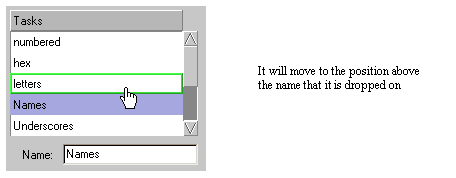
If you have more than one task you may have to change the order of the tasks to match the names correctly. The JobGenie searches for jobs in the order of the tasks, and an earlier task may pick up a job that you did not want it to because it matched the criteria you specified. In this case you may have to change the order of the tasks. To do this, select the task and drag it to a different position in the list.
The option "Show detailed Log" can give you some hints as to what has and what has not matched during a poll. But this is really meant for Serendipity Support. Turn this on for the task that you are not catching and save the genie. Then do a manual poll. It may be a good idea to make sure that the blackmagic.log is not too big before you do. This can grow quite large and should be deleted periodically. It will recreate the log if it does not exist.