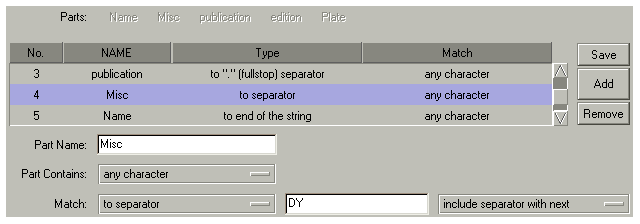
This section is designed to show some examples of JobGenie configurations for the other filenames that were in our examples. For each picture below, a brief explanation will be given.
This example has 5 parts in total so that the name can be broken down. This aids the display and naming of the jobs. The line item highlighted has been given a name of Misc and is matching to a user defined separator, in this case "DY". You will also see that we are including the separator with the next part, which is the name. We are also reading this file from right to left so the first part that we read is the plate. If the rest of it was the Jobname then you can define it in 2 parts with the 2nd part as "to end of string".
With defining so many parts you can see that you have versatility over name grouping and display.
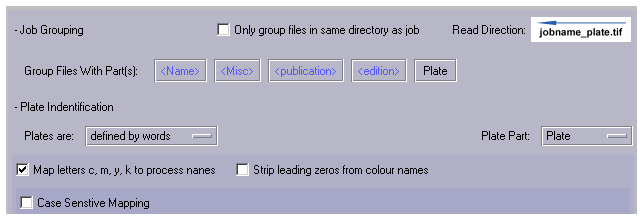
We have selected 4 out of the 5 parts to group as the job name.

But we only want to display the name of the job in the RIP Monitor.