
BlackMagic now supports the Roland FJ400/500 plotters. These are variable dot 8 colour ink jet plotters. They can operate in four colour mode as CMYK, in 6 colour mode as CMYK LightCyan LightMagenta (CMYKLcLm) and CMYK Orange Green (CMYKOG), and in 8 colour mode as CMYK CMYK. For each of these modes the colour space setting in the BlackMagic page setup must be set accordingly.
For 8 colour (double 4 colour) mode you must make sure that the Roland is configured correctly with the regard to the inks that are installed. The 8 cartridges must have the same ink types in and configured on the control panel accordingly. You must select CMYK as the colour space on the pagesetup and all 8 inks will be used.
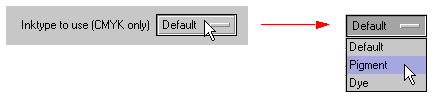
If you have CMYK Dye inks one side and CMYK Pigment inks the other, then you are able to select which inks types to print to through the customise options for the printer.
To show the customise options click the customise button next to the printer

And the following window appears.
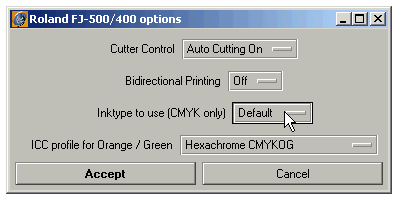
Change the ink type as desired and accept the changes or cancel to close the window without changing anything.
From the Customise options window you also have control of the auto cutting feature and the Bidirectional printing mode. This can either be on or off, i.e. in unidirectional mode. This mode is slower but produces better quality prints.

Note: This driver does not currently support the printer in full 8 colour mode where the 8 colours are CMYKLcLmOG.
The picture below shows the selection of the resoloutions.

The resolution selected determines the print mode and the dot type. This is shown in the table below