
Epson have released the 5500 variable dot 6 colour ink jet printer and it is fully supported in this version. This is a sheet fed printer capable of printing up to super A3 format. This is a new driver that comes with the Epson license.
On the printers tab of the control panel select the Epson 5500 driver.
Create a new pagesetup that points to the printer that you have created and then adjust the customise features to suit your required output. Select the customise button to display the features for this printer.
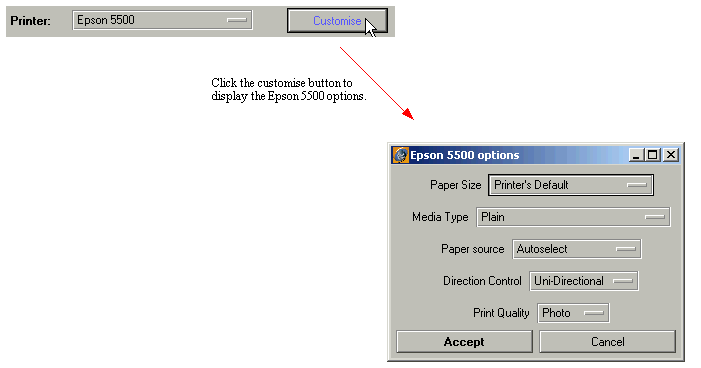
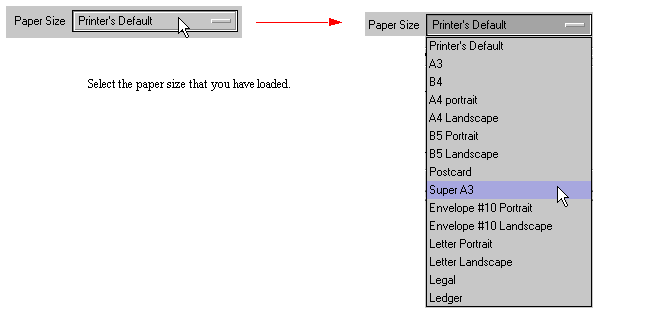
There are various options to configure for the Epson 5500. You can select the desired paper size
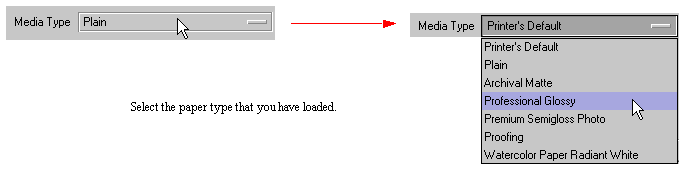
You can also select the type of paper that is loaded. This effects the dot type that is used so the correct paper should always be selected for best results.
Note: There are recommended resolution settings depending on the paper type. See Recommended settings for paper types
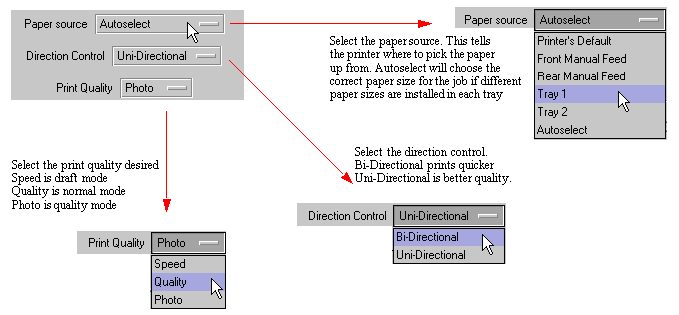
Other controls include the paper source, direction control and print qulaity.
The supported resolution settings are shown in the picture below. The resolution settings should be used in conjunction with the settings in the customise area to attain optimum quality of output. See the table for more information.

From tests at Serendipity Software we have found that photo mode gives the best quality. If you are printing at 360dpi or 720 x 720dpi, then one of the faster modes would be more suited for speed.